Configure Custom Error Pages in Plesk for Windows Hosting
When you want to display custom error pages such as 404 or 500 errors for your website. This article explains how to configure custom error pages in Plesk for Windows hosting.
Follow the steps below to add custom error pages for your Windows hosting plan.
Step 1: Log in to the Plesk panel of the domain name for which you wish to set custom error pages.
Step 2: Add the custom error page.
-
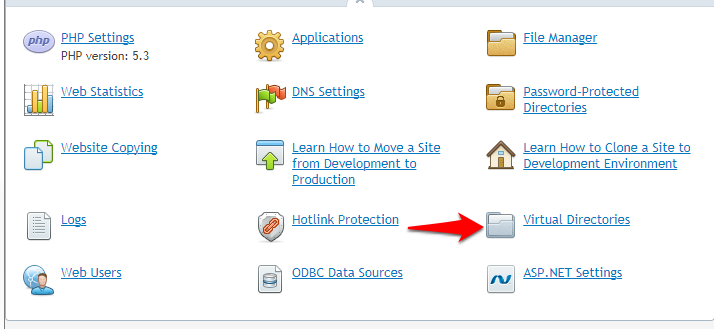
Click on Virtual Directories.
-
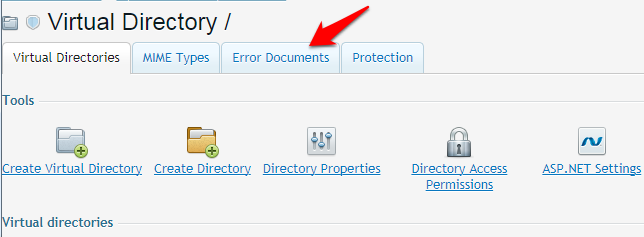
Click on Error Documents.
-
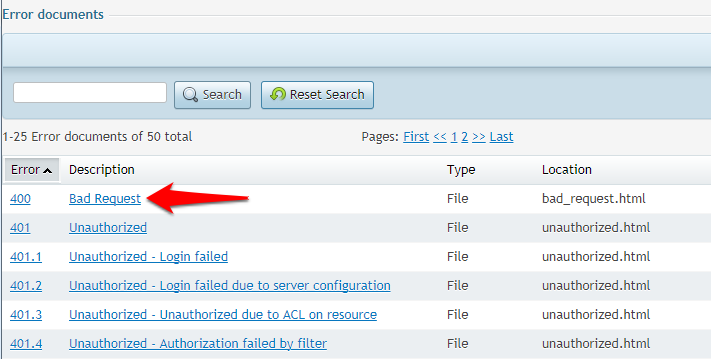
Click on the error you wish to customize.
-
Select URL in the Type menu and enter the path to your document in the Location field. The path should consist of "https://" plus the path to the file.
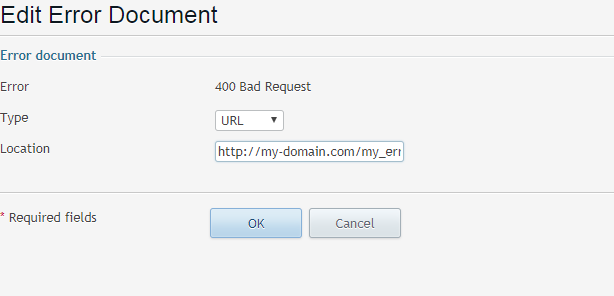
Example: Your domain name is example.com, and you have created a file named badrequest_400_1.html and saved it in the httpdocs\my_errors directory. To use this file as an error document, you need to type the following URL into the Location field: https://example.com/my_errors/badrequest_400_1.html.