Knowledge Base
Categories: DNS for Products
How to Add or Update PTR Records on a VPS or Dedicated Server
When reverse DNS needs to be configured for a server IP address. This article explains how to add or update PTR records on a VPS or Dedicated Server.
PTR Records are used for reverse DNS configuration. Reverse DNS (rDNS) is a method of resolving an IP address into a domain name. This is the opposite of DNS, where the domain name is resolved to an IP address.
You can add a PTR record on your VPS/Dedicated hosting from the server management panel by following the steps below.
Step 1: Log in to your Order Management panel.
Step 2: Manage PTR Records
In the Server Management Panel, click Manage PTR records.
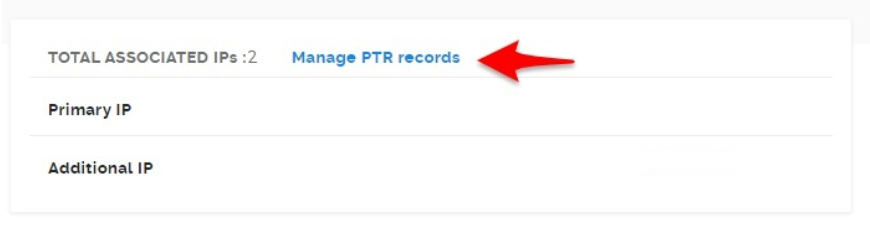
- Add/Update the PTR value.
- On the IP Address Management page, enter the PTR value that you want to associate with the IP address.
- Click the check mark to save the value.
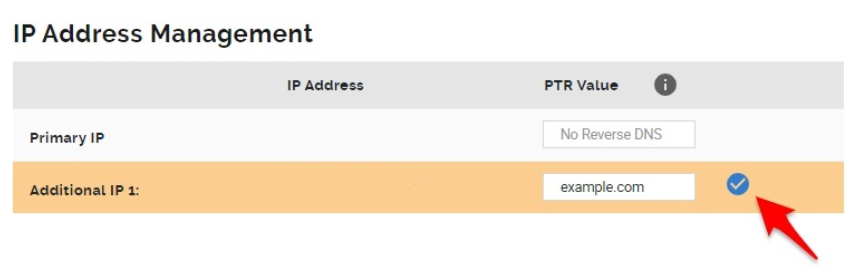
- Once the records are updated, you will see a success message.
- Delete PTR value.
- On the IP Address Management page, click the delete option to remove the record associated with the IP address.
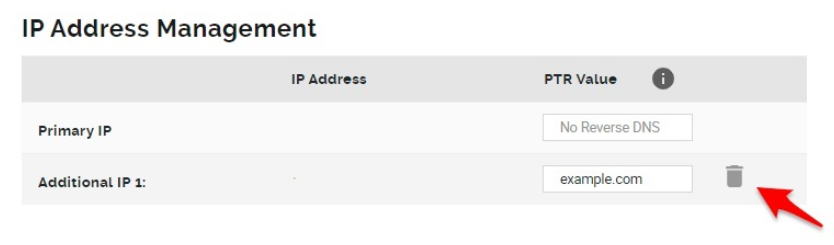
- You will see a confirmation message once the record is deleted.
- On the IP Address Management page, click the delete option to remove the record associated with the IP address.
Did you find this article helpful?