How to Enable or Disable GDPR Protection for a Domain
When you want to control GDPR-based masking of your domain contact details. This article explains how to enable or disable GDPR protection in the control panel.
The GDPR Protection feature prevents your personal information from being displayed in the public WHOIS records. This feature is only available for domain names registered by users in the European Economic Area.
Disabling GDPR Protection
The WHOIS Privacy is applied automatically for all eligible domain names. However, there may be instances where the you may wish to have your personal contact details displayed in the WHOIS. For instance, when you wish to transfer a domain name to another registrar, you may need to display your email address in the Registrant contact information, so the gaining registrar can obtain it to initiate the transfer authorization process.
Follow the steps below to disable the GDPR Protection for your domain name.
Step 1: Log in to your control panel.
Step 2: Navigate to the Order Information view.
Type the Domain Name of the order in the search field on the homepage, select Order from the drop-down, and click on Search.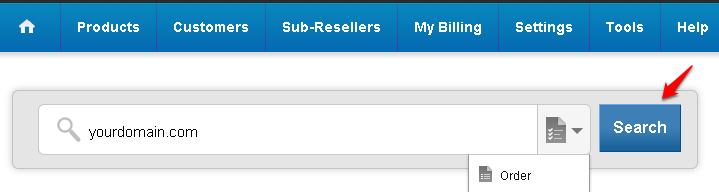
Step 3: Disable GDPR Protection
-
Click on GDPR Protection.
-
Click on Disable.
-
Click on Update Status to confirm.
-
An email will be sent to the domain’s Registrant contact to authorize the request. You can resend this email by clicking on the Resend authorization email link.
The Registrant must authorize the request to disable GDPR Protection within 5 days. If the Registrant does not complete the authorization, the WHOIS Privacy will remain enabled for the domain name.
Enabling GDPR Protection
Follow the steps below to enable GDPR Protection for your domain name.
Step 1: Log in to your control panel.
Step 2: Navigate to the Order Information view.
Type the Domain Name of the order in the search field on the homepage, select Order from the drop down and click on Search.
Step 3: Enable GDPR Protection.
-
Click on GDPR Protection.
-
Click on Enable.
-
Click on Update Status to confirm.