Knowledge Base
How to Test MySQL Database Connectivity Using PHP
When you want to verify that your website can connect to its database. This article explains how to test MySQL connectivity using a PHP script.
Provided below is a simple PHP script to test MySQL database connectivity. The result of this script displays the names of the tables present within the specified database.
Sample Script
          <!--?
            $connect=mysql_connect("dbserver","dbuser","dbpassword") or die("Unable to Connect");
            mysql_select_db("dbname") or die("Could not open the db");
            $showtablequery="SHOW TABLES FROM dbname";
            $query_result=mysql_query($showtablequery);
            while($showtablerow = mysql_fetch_array($query_result))
            {
            echo $showtablerow[0]." ";
            }
          ?-->
Explanation about the variables used in the script:
- dbserver: Mention the value as localhost for Linux Hosting (cPanel). For Windows Hosting (Plesk), the MySQL Server IP needs to be mentioned.
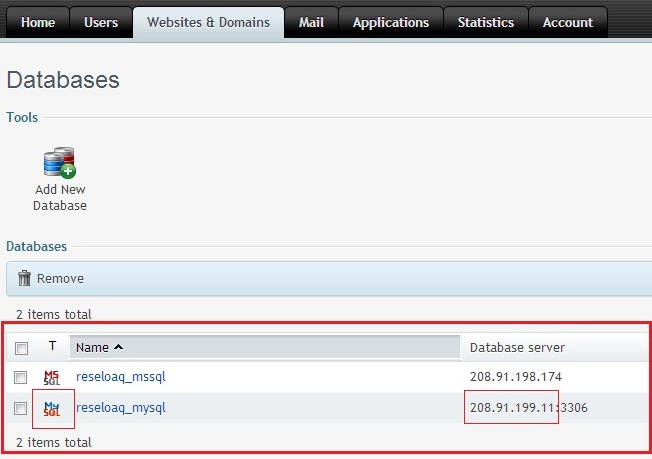
- dbname: Specify the complete database name, including the prefix. For example, reseloaq_mysql.
- dbuser: Mention the database user associated with the database.
- dbpassword: Mention the password for the above database user.
Did you find this article helpful?