Knowledge Base
Categories: cp_orders_actions
How to Disable Service Tax or GST in the Reseller Control Panel
When you need to stop applying Service Tax or GST to customer billing in your reseller account. This article explains how to disable tax settings in the Reseller Control Panel.
Follow the steps below to stop charging Service Tax to your Customers and Sub-Resellers.
- Log in to your Control Panel.
- Navigate to the Configure Tax Rules page.
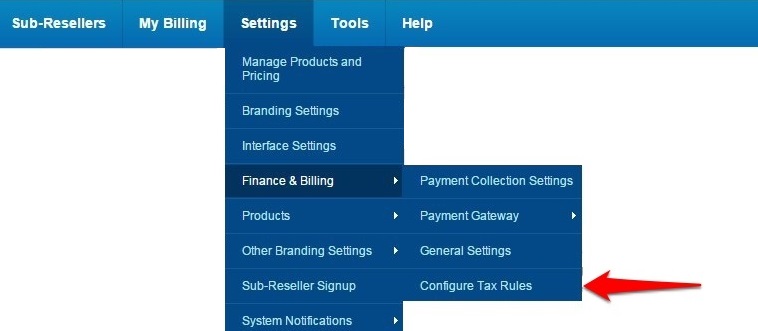
In the menu, click on Settings > Finance & Billing> Configure Tax Rules.
- Disable Service Tax.
-
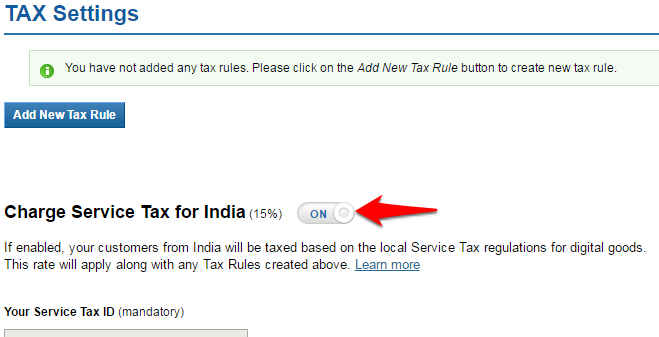
Click on the ON / OFF toggle next to Charge Service Tax to disable Service Tax.
-
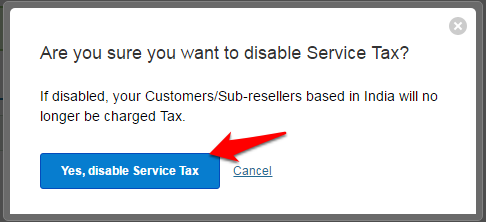
Click on Yes, disable Service Tax button to confirm.
-